Introduction to Unix and Linux
What an operating system and a kernel are, where Unix and Linux came from, GNU, distributions, and the shell — the foundation for the course.
This first week sets the foundation for everything that follows. Before we start writing programs that talk directly to the operating system, we need a shared vocabulary: what an operating system actually is, what a kernel does, where Unix and Linux came from, and how we drive the system from the shell. By the end of the week you should have a working Linux environment and be comfortable moving around it from the command line.
The notes below are based on the lecture slides — you can open the full, interactive deck here:
Why study system programming?
System programming is where software meets the machine. It is worth your time because it is:
- Foundational. It explains how software and hardware actually interact — the ideas underneath every program you will ever write.
- Relevant. It powers cloud services, AI systems, embedded devices, and anything that has to manage resources carefully.
- A bridge between theory and practice. It connects operating-system concepts to algorithms, networking, security, and databases.
- Versatile. The same fundamentals apply to AI/ML, cybersecurity, game development, web services, and enterprise systems.
- An innovation edge. Robotics, autonomous vehicles, and healthcare systems are built on top of it.
- In demand. Engineering and infrastructure roles at companies like Google, Amazon, and Meta lean heavily on these skills.
Why focus on Linux (and Unix)?
Almost all of this course happens on Linux, because Linux and Unix-like systems run the computing world:
- 96.3% of the top one million web servers run Linux.
- 100% of the top 500 fastest supercomputers run Linux, and over 92% of all supercomputers use Linux variants.
- Mobile is dominated by Android (~72%) — built on the Linux kernel — with iOS (~28%) making up most of the rest.
- Around 90% of cloud infrastructure (AWS, Azure) runs on Linux.
Learning this environment is not an academic exercise — it is the platform your code will actually run on.
What is an operating system?
An operating system (OS) is system software that manages the computer's hardware and software resources and provides common services for programs. The simplest way to picture it is as a stack of layers, where each layer only talks to its neighbours:
┌──────────────────────┐
│         User         │
├──────────────────────┤
│     Applications     │
├──────────────────────┤
│   Operating System   │
├──────────────────────┤
│       Hardware       │
└──────────────────────┘
The OS sits between applications and hardware. Two useful mental models capture what it does:
- A virtual machine — it hides messy hardware details behind a clean, uniform interface.
- A resource manager — it shares the CPU, memory, and devices fairly among many programs.
The kernel
The kernel is the core of the operating system. It is the part that bridges applications and hardware, and it manages the machine's fundamental resources — memory, processors, and file systems. Around the kernel sit the user-facing pieces we usually think of as "the system": applications, the shell, the package manager, and the window manager.
┌──────────────────────────────────────────────┐
│               Operating System               │
│  ┌──────┐ ┌───────┐ ┌───────────┐ ┌────────┐ │
│  │ Apps │ │ Shell │ │  Package  │ │ Window │ │
│  │      │ │       │ │  manager  │ │ manager│ │
│  └──────┘ └───────┘ └───────────┘ └────────┘ │
│  ┌──────────────────────────────────────────┐│
│  │                  Kernel                   ││
│  └──────────────────────────────────────────┘│
└──────────────────────────────────────────────┘
Kernel vs. user space
Programs run in user space and cannot touch hardware directly. When they need something privileged — reading a file, sending data over the network — they ask the kernel through a system call. That boundary between user space and kernel space is the central theme of this course.
Kernels are organized in different ways. A monolithic kernel (like Linux) runs most services in one large kernel space for speed; a microkernel keeps the kernel tiny and pushes services into user space for isolation; hybrid kernels mix both approaches.
A brief history: Unix
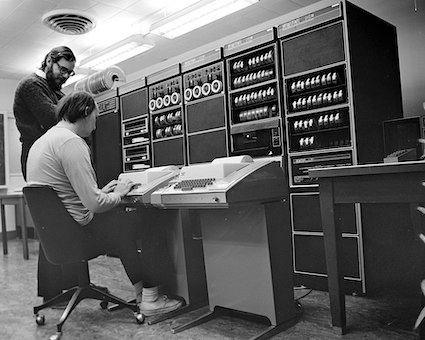
Unix is a computer operating system first developed in 1969 at Bell Labs. In 1972 it was rewritten in the newly created C programming language — a decision that made it portable across machines and shaped operating systems (and C) for the next fifty years.
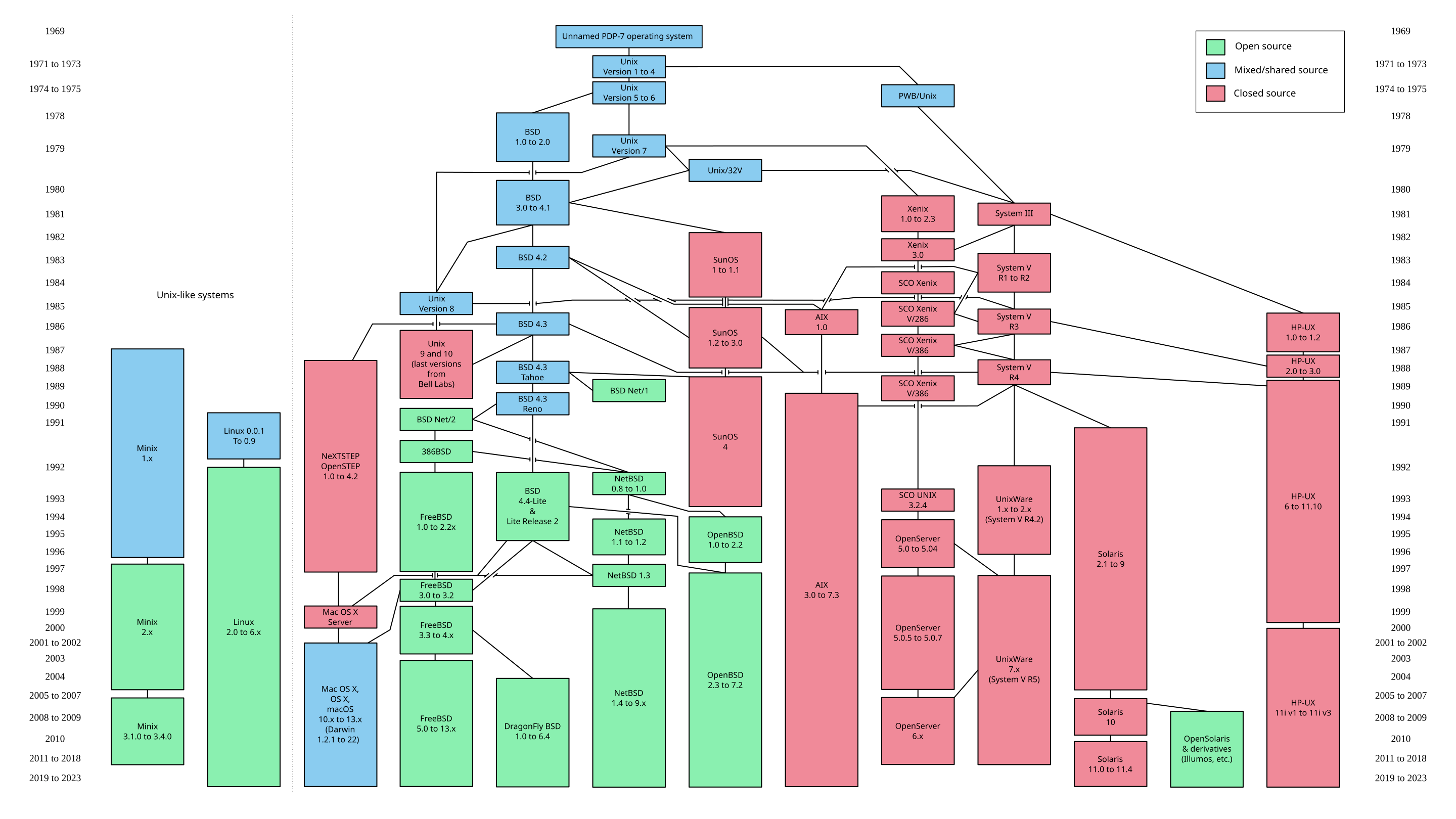
Everything Unix touched branched and evolved into a large family of systems — the BSDs, commercial Unixes (Solaris, HP-UX, AIX), macOS, and the Unix-like systems including Linux:
Linux
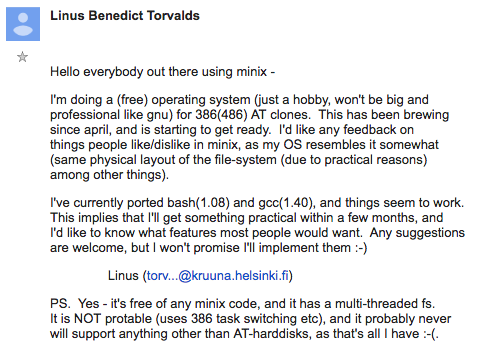
Linux is a Unix-like kernel created by Linus Torvalds in 1991, originally as a free alternative inspired by Minix (a small teaching kernel by Andrew Tanenbaum). It began as the now-famous hobby announcement:
Strictly speaking, Linux is only the kernel. To get a usable operating system it is combined with a large body of system software — most of it from the GNU project.
GNU and free software
GNU is a complete free-software operating system, compatible with Unix. Its name is the recursive acronym "GNU's Not Unix". GNU was conceived as a free alternative to Unix, but its own kernel (the Hurd) never became mainstream — so in practice GNU's tools are most commonly paired with the Linux kernel.
That pairing is why the systems we use are often called GNU/Linux: the Linux kernel plus the GNU userland (compiler, shell, core utilities, and more).
GNU/Linux distributions
A distribution is a complete operating system built on GNU and Linux. Each distribution bundles its own selection of preinstalled software and a package manager for installing and updating everything else. Well-known examples include Ubuntu, Debian, Fedora, CentOS, Arch Linux, and Gentoo.
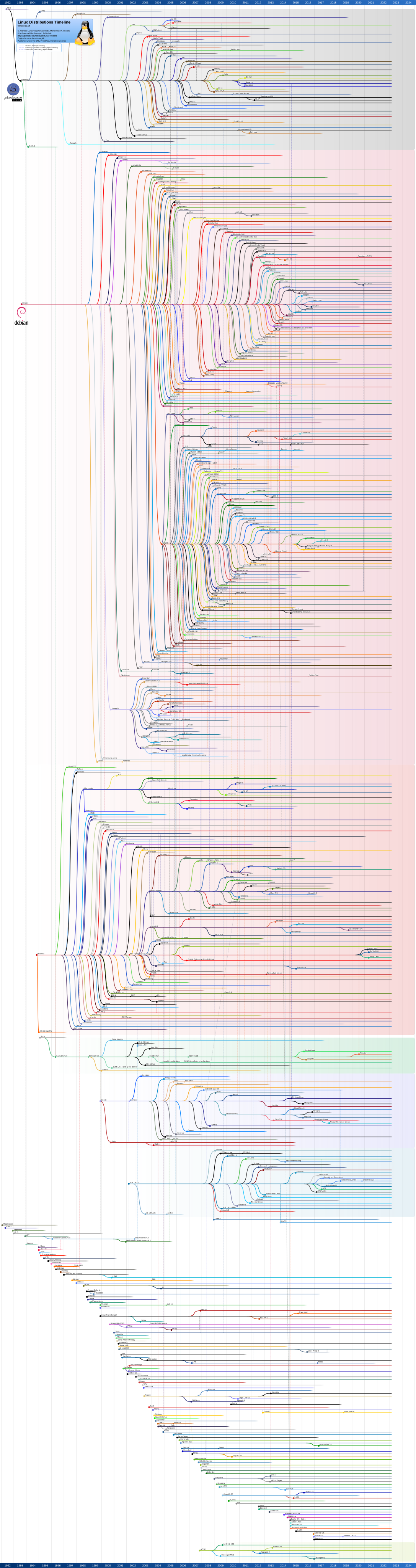
There are hundreds of them, related by a sprawling family tree:
For this course, Ubuntu is the recommended starting point.
The shell and the command line
The shell is a program that executes the commands you type. It is how we drive a Unix system precisely and reproducibly — and where much of this course happens.
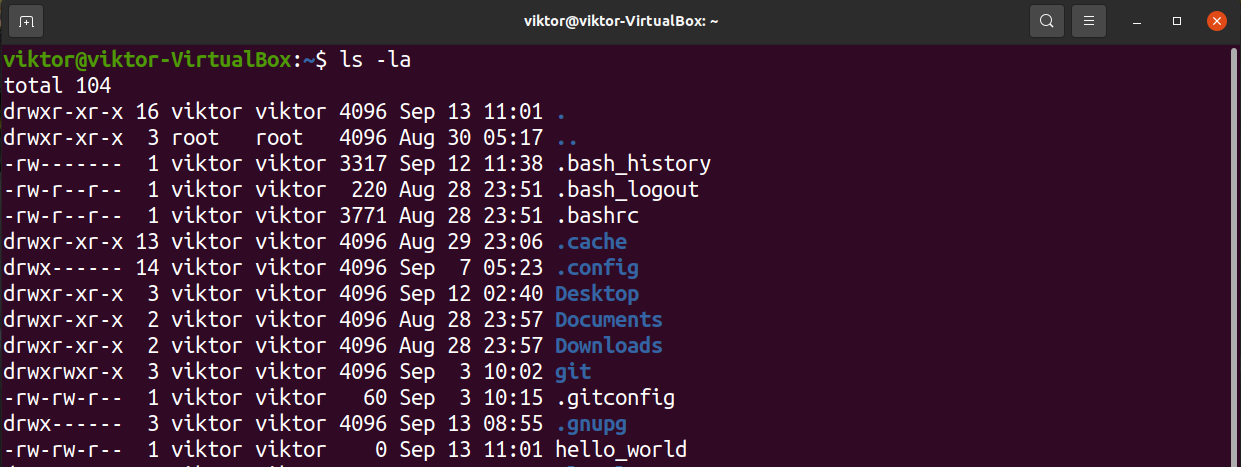
Essential commands
A small set of commands covers most day-to-day work:
| Command | What it does |
|---|---|
ls | List directory contents |
cd | Change the current directory |
pwd | Print the working directory |
mkdir | Create a directory |
rm / rmdir | Remove files / empty directories |
cp / mv | Copy / move (or rename) files |
touch | Create an empty file or update its timestamp |
cat / less / more | Print or page through a file's contents |
chmod | Change file permissions |
chown | Change file ownership |
echo | Print text or a variable's value |
env | Show environment variables |
man | Open the manual page for a command |
sudo | Run a command as the superuser |
nano / vi / vim | Edit files in the terminal |
clear | Clear the terminal screen |
exit | Close the shell session |
When you are unsure what a command does or which flags it takes, man <command> is always
the first place to look.
Practice / lab
- Set up a virtual machine. Install Ubuntu (or another Linux distribution) in VirtualBox or VMware.
- Command-line basics. Practise
ls,cd,pwd,man,echo,cat; try redirection (>,>>) and pipelines (|); install a package withapt. - Development environment. Install and test
gcc,g++,make, andgit, and set up an editor (VS Code or Vim). - Git & GitHub. Initialize a repository, make a commit, and push it to GitHub.
- Explore your system. Check your kernel version with
uname -aand your distribution withlsb_release -a.
Homework
- ENV-1: Setup GNU/Linux Environment — install a Linux distribution and capture your environment details.
When you start writing and compiling programs, the Guides and Samples sections walk through the toolchain step by step.
References & resources
Required
Optional / enrichment
- What is a kernel? (video)
- Microkernel vs monolithic kernel (video)
- Linux distribution timeline (full diagram)
- Эволюция вычислительных систем (RUS, video)
Tools
- Download VirtualBox
- Download Ubuntu
- Install Ubuntu in VirtualBox (video)
- Git and GitHub basics (video)
Self-check
- What is the difference between the kernel and user space?
- Name two major differences between Linux and Windows.
- Which shell command prints your current directory?
- What is the purpose of a package manager in a Linux distribution?
- Why are the systems we use often called "GNU/Linux" rather than just "Linux"?